
FeverCare – Fever Dosage Support Tool
Bác sĩ bên con ©
Guide Version: 20/07/2026
This guide has been prepared based on the desktop computer interface. The interface on mobile devices may have some minor differences in layout or display; however, the usage process and main functions remain unchanged.
I. Introduction to FeverCare
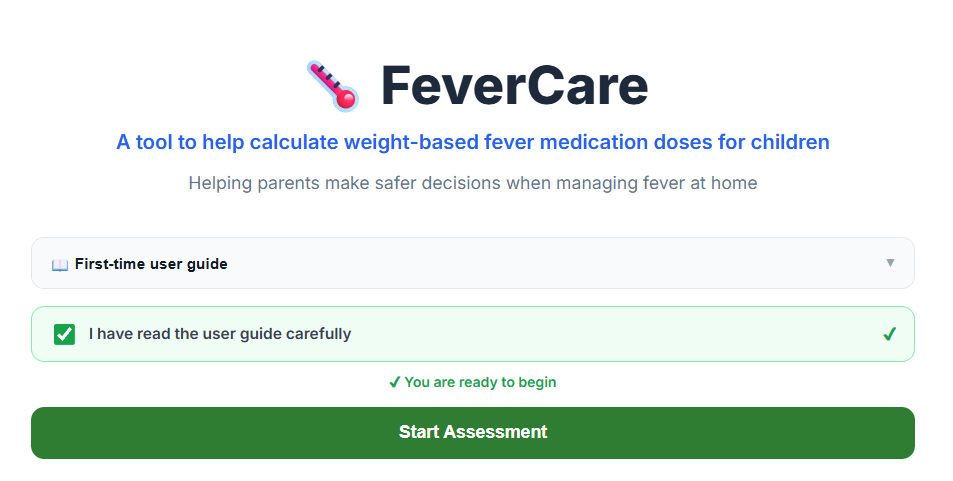
FeverCare is a tool designed to support parents in referencing fever medication doses for children based on the information provided by the user, including:
- Child’s age.
- Current body weight.
- Measured temperature.
- Previous medication use.
- Selected fever medication and available medication products.
FeverCare supports parents by:
- Providing reference information on whether fever medication use should be considered.
- Supporting the selection of appropriate fever medication among available options.
- Calculating a reference dose range based on body weight.
- Converting the active ingredient dose into the corresponding amount for specific medication products.
The results generated by FeverCare are based on information entered by the user and predefined calculation principles programmed into the system.
FeverCare is not a diagnostic tool and does not replace medical examination, professional consultation, or treatment decisions made by healthcare professionals.
Users should verify the accuracy of the information entered and evaluate the child’s actual condition before applying any guidance provided by the tool.
II. FeverCare Usage Process
Step 1. Launching the Tool
To access FeverCare on the Bác sĩ bên con website, users can choose one of the following methods:
- Select the “Fever Management” tool directly from the Home page.
- Access the “Fever Management” section from the left navigation menu.
Before using FeverCare for the first time, users should read the user guide and safety information carefully.
After confirming that they understand the provided instructions, users can begin the assessment process.
Step 2. Entering Child Information
FeverCare requires users to provide basic information about the child.
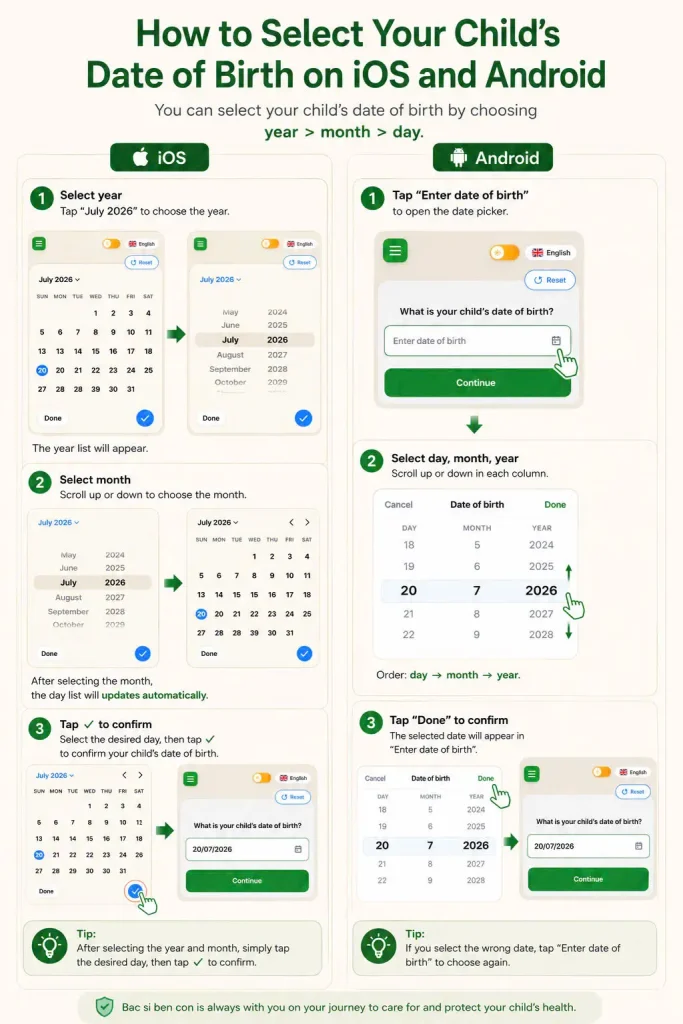
2.1. Date of Birth
This information is used to:
- Determine the child’s age group.
- Assess the suitability of different medication options.
- Apply age-related safety limitations.
2.2. Current Body Weight
Users enter the child’s current body weight.
This is the most important information in the dosage calculation process because fever medication doses are calculated based on the amount of active ingredient per body weight (mg/kg).
The most recent body weight measurement close to the time of fever should be used to improve result accuracy.
2.3. Current Temperature
Users enter the child’s measured temperature.
This information helps FeverCare:
- Assess the fever level based on the provided data.
- Support selection of a specific reference dose within the appropriate dose range when applicable.
Step 3. Answering Safety Screening Questions
Before calculating medication doses, FeverCare performs a safety screening process to identify situations that may require medical evaluation rather than home management alone.
Users may be asked about:
- Current warning signs or abnormal symptoms.
- Child’s alertness level and ability to eat, breastfeed, or drink fluids.
- History of febrile seizures.
- Previously used fever medication.
- Time of the most recent medication dose.
- History of allergy to Paracetamol or Ibuprofen.
- Other factors that may affect medication use.
Cases Requiring Medical Evaluation
If the provided information indicates that the child may require direct medical assessment, FeverCare will prioritize displaying guidance:
Seek medical attention or contact a healthcare professional
In this situation, the system may not continue with dose calculation to avoid users focusing only on fever medication while overlooking a condition that requires further evaluation.
Step 4. Selecting Fever Medication
After completing the safety screening process, FeverCare displays the available medication options.
4.1. Paracetamol
Paracetamol is displayed as the preferred option in most situations.
When Paracetamol is selected, the system continues dose calculation based on:
- Child’s body weight.
- Reference dose range.
- Maximum daily usage limits.
4.2. Ibuprofen
Ibuprofen is an alternative option in appropriate situations.
Because Ibuprofen has age-related and condition-related limitations, FeverCare may apply additional verification steps before allowing dose calculation.
Children older than 6 months
The Ibuprofen option can be selected normally if no contraindication or safety concern is identified.
Children 6 months of age or younger
The Ibuprofen option may be displayed with restricted access, including a lock icon and a notification advising users to consult a healthcare professional before use.
If the user chooses to continue with Ibuprofen, FeverCare displays an additional confirmation step:
Has the child been instructed by a healthcare professional to use Ibuprofen?
If selecting “Yes”:
The system continues to calculate the reference dose while applying additional safety limitations for younger age groups.
If selecting “No”:
The system will not continue with Ibuprofen selection and will guide the user back to a more appropriate option.
Step 5. Receiving Reference Dose Results
After completing the previous steps, FeverCare displays the calculated results.
5.1. Summary of Information Used
The result screen displays:
- Child’s date of birth/age.
- Body weight.
- Temperature.
- Selected medication.
- Important safety screening information.
Users should review these details before applying the results.
5.2. Reference Dose Range
FeverCare displays a calculated reference dose range based on the child’s body weight.
Example:
Reference dose range: 400–600 mg per dose
When appropriate, the system may also provide a specific reference dose within this range.
Example:
Reference dose example: 500 mg per dose
The purpose of displaying a specific dose value is to help users better understand how the reference dose range may be applied through an illustrative example. It does not represent a fixed prescribed dose or replace evaluation by a healthcare professional.
5.3. Medication Usage Guidance
The result may include:
- Minimum interval between doses.
- Maximum number of doses within 24 hours.
- Medication usage precautions.
- Warnings regarding duplicate active ingredients.
- Considerations related to medication administration routes.
If the child belongs to a group requiring caution when using Ibuprofen, FeverCare will display the corresponding warning.
5.4. Usage Limitation Notice
At the bottom of the result section, the system always displays the following notice:
Results provided by FeverCare are for reference purposes only and are based on the information provided by the user. They do not replace medical examination, diagnosis, or treatment decisions made by healthcare professionals.
Step 6. Converting the Dose According to Available Medication Products
After viewing the reference dose, users can select:
“Reference Dose by Medication Product”
This function converts the active ingredient amount (mg) into the corresponding medication amount based on the selected product strength.
Users can choose:
- Medication is available at home.
- Medication is not available at home.
6.1. Medication Not Available at Home
If the user selects:
No
FeverCare may display common medication products for reference when choosing a suitable medication.
The displayed information may include:
- Product name.
- Route of administration.
- Strength/concentration.
- Corresponding reference amount.
Illustrative image
6.2. Medication Available at Home
If the user selects:
Yes
Users can search for or select:
- Dosage form.
- Medication name.
- Medication strength.
After selection, FeverCare will:
- Display the active ingredient amount that needs to be converted.
- Calculate the corresponding amount for the selected medication product.
- Present the result in an easy-to-use format.
Examples:
- Take X mL of syrup.
- Take Y tablets.
- Use Z sachets.
Step 7. Instructions for Special Medication Products
Some medication products may require additional preparation before use, such as:
- Splitting tablets.
- Dissolving medication.
- Preparing medication according to instructions.
In these cases, users can select:
“View Instructions”
to review the relevant preparation steps.
Step 8. Restarting the Calculation Process
Users can select:
“Restart” or “Recalculate”
at any time to begin a new calculation process.
The process should be restarted when:
- The summary information displayed in the results is incorrect or does not accurately reflect the child’s current condition.
- The user needs to update, add, or modify previously entered information.
III. Warnings and Limitations of Use
FeverCare is developed to support parents in accessing fever medication information in a convenient and structured manner.
The tool cannot:
- Perform a direct medical examination of the child.
- Assess all clinical signs and symptoms.
- Determine the underlying cause of fever.
- Replace professional medical judgment or treatment decisions made by healthcare professionals.
The accuracy of the results depends on:
- The accuracy of the information entered by the user.
- Correct selection of medication and medication strength.
- The user’s understanding and proper application of the provided instructions.
If the child develops abnormal signs or the parent has concerns regarding the child’s condition, the user should contact a healthcare professional for appropriate assessment.
IV. FeverCare User Experience
Before using FeverCare in a real situation, users should spend time becoming familiar with how the tool works.
Users can practice with a simulated scenario to become familiar with the complete usage process, including:
- Entering child information.
- Answering safety screening questions.
- Selecting fever medication.
- Following how the system generates results.
- Reading and understanding the accompanying instructions and warnings.
Becoming familiar with the process beforehand helps users better understand how FeverCare works and reduces potential confusion when using the tool during actual child care situations.
FeverCare also provides several options designed to improve the user experience, including:
Multilingual Support
FeverCare provides the interface and guidance content in Vietnamese and English, allowing users to select their preferred language.
Dark Mode
Dark Mode allows users to choose an interface appearance that is more suitable for different usage conditions, particularly in low-light environments.
Progress Indicator
During the FeverCare process, the system displays a progress indicator to help users understand their current position within the overall assessment and guidance workflow.
The progress indicator helps users:
- Understand which steps have been completed and which steps remain in the process.
- Follow the question-answer process more comfortably instead of feeling interrupted or uncertain about when the results will be available.
- Have additional time to review and provide accurate information at each assessment step.
Because FeverCare performs safety screening steps before generating results, the number of questions may vary depending on the information provided by the user.
The progress indicator helps users understand that each question is an essential part of the assessment process, contributing to more appropriate reference results.
Bác sĩ bên con © 2026
FeverCare – Fever Medication Dosage Support Tool for Children