
Child Growth Assessment Support Tool
GrowthCare
Bác sĩ bên con©
Guide version: 20/07/2026
This growthcare user guide has been prepared based on the user interface displayed on a personal computer. The interface on mobile devices may have minor differences in layout or display; however, the usage process and main functions remain unchanged.
I. Introduction to GrowthCare
Before exploring how to use GrowthCare, let us first understand this tool.
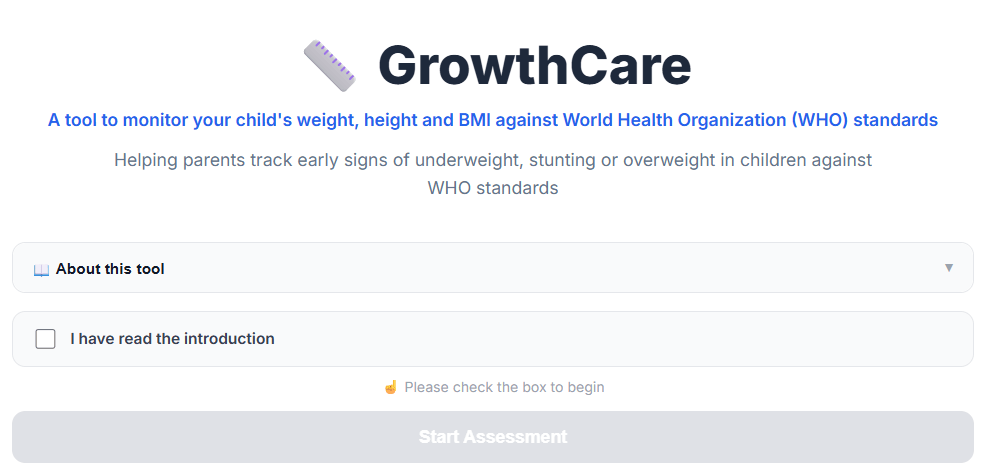
GrowthCare is a tool designed to support parents in referencing their child’s growth status based on the information provided, including:
- Child’s date of birth.
- Child’s sex.
- Current weight.
- Current length or height.
Based on these inputs, GrowthCare uses the World Health Organization (WHO) Child Growth Standards to analyze important growth indicators, including:
- Weight-for-age.
- Length/Height-for-age.
- Weight-for-length/Height.
The tool supports parents in:
- Monitoring changes in their child’s weight and height over time.
- Referencing the child’s growth position compared with children of the same age and sex.
- Recognizing growth indicators that are lower or higher than reference ranges.
- Understanding the meaning of commonly used growth indicators in pediatrics.
GrowthCare results are generated based on information entered by users and calculation methods developed according to growth standards.
GrowthCare:
- Is not a diagnostic tool for malnutrition, overweight, obesity, or medical conditions.
- Does not replace medical examination, direct assessment, or professional advice from healthcare providers.
- Does not provide a complete assessment of a child’s nutritional status, physical development, or overall health.
Users should verify the accuracy of entered information and interpret the results together with the child’s actual condition before making any care decisions.
II. How to Use GrowthCare
Step 1. Launch the Tool
To access GrowthCare on the Bác sĩ bên con website, users can choose one of the following methods:
- Select the “Growth Assessment” tool directly from the Home page.
- Access the “Growth” section from the navigation menu.
Before using the tool for the first time, users should read the user guide and important notes regarding result interpretation.
After confirming that they understand the provided information, users can begin the assessment process.
Step 2. Enter Child Information
GrowthCare requires users to provide basic information about the child.
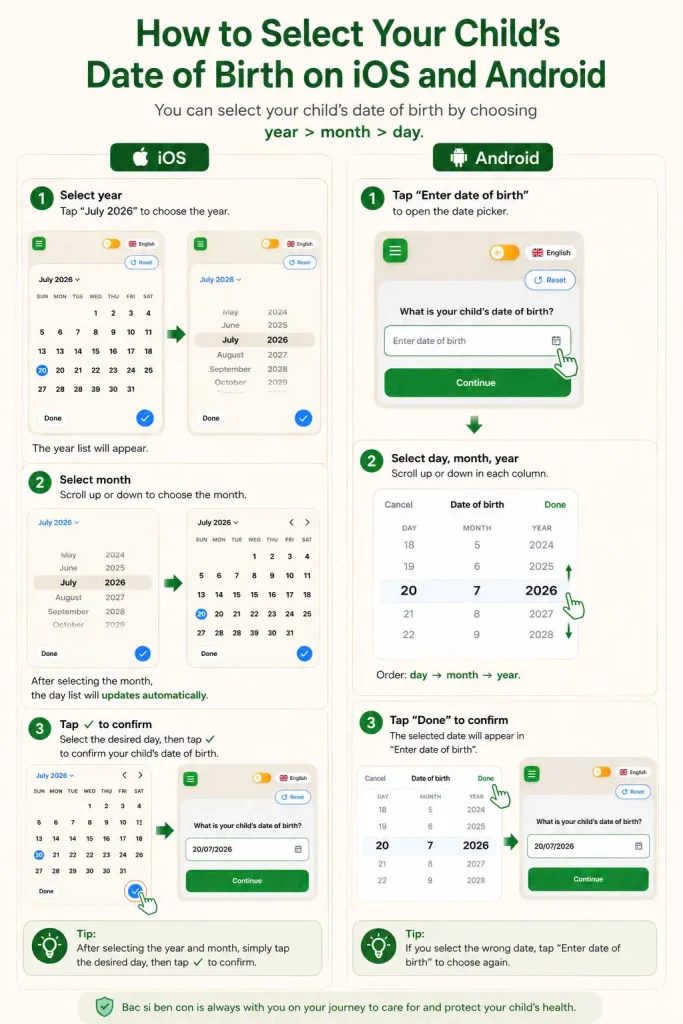
2.1. Child’s Date of Birth
The date of birth is used to:
- Calculate the child’s exact age at the time of assessment.
- Identify the appropriate age group in the WHO growth standards.
- Apply the appropriate assessment method based on age.
For more accurate results, users should enter the correct day, month, and year of birth.
2.2. Child’s Sex
GrowthCare requires users to select the child’s sex.
This information is necessary because:
- WHO growth standards are developed separately for boys and girls.
- The interpretation of the same weight or height value may differ between sexes.
2.3. Current Weight
Users enter the child’s current weight.
Weight is used to assess:
- Weight-for-age.
- Weight-for-length/height.
The most recent weight measurement close to the assessment time should be used.
For better accuracy:
- The child should be weighed using an appropriate measuring device.
- Measurements should ideally be taken under similar conditions during follow-up assessments.
2.4. Current Length or Height
Users enter the child’s current length or height.
Depending on age:
- Younger children may be assessed using recumbent length.
- Older children may be assessed using standing height.
This information is used to assess:
- Length/height-for-age.
- The relationship between weight and length/height.
Step 3. Growth Calculation and Analysis
After all required information is entered, GrowthCare analyzes the data based on:
- Child’s age.
- Sex.
- Weight and height measurements.
The system calculates the child’s growth position according to WHO standards using statistical indicators such as:
- Z-score.
- The deviation from the median value of children of the same age and sex.
The results help users understand where the child’s measurements are positioned on the growth chart.
Step 4. View Growth Assessment Results
Illustration
The results screen displays:
4.1. Summary of Input Information
Including:
- Child’s age.
- Sex.
- Weight.
- Length/height.
Users should review these details before interpreting the results.
4.2. Weight-for-Age Assessment
This indicator provides a reference for:
- The child’s current weight compared with children of the same age and sex.
The result may indicate:
- Weight within the reference range.
- Weight lower or higher than commonly observed levels.
Note:
Weight-for-age alone cannot fully assess nutritional status because it does not directly reflect the relationship between weight and height.
4.3. Length/Height-for-Age Assessment
This indicator provides a reference for:
- The child’s height development compared with children of the same age and sex.
The result helps identify:
- Height appropriate for age.
- Height lower or higher than the reference range.
4.4. Weight-for-Length/Height Assessment
This indicator evaluates the relationship between:
- Current weight.
- Current length/height.
It is an important indicator used to reference:
- Low weight relative to height.
- Weight appropriate for height.
- High weight relative to height.
Step 5. Understanding the Assessment Results
GrowthCare may display results in the following forms:
- Written descriptions.
- Position on the growth chart.
- Reference classifications.
Examples:
The girl’s height is approximately 0.6 cm above the average height of children of the same age and sex, and remains within the normal range according to WHO standards.
Or:
The girl’s weight-for-height indicator exceeds the +2 SD threshold. According to WHO standards, the child is classified as overweight. This result indicates that the child’s weight is higher than the appropriate range for their height.
GrowthCare interpretations are intended to help parents better understand growth data and do not replace professional medical assessment.
Illustration
Step 6. Monitoring Growth Over Time
Child growth is a continuous process.
Parents should:
- Monitor weight and height regularly.
- Compare changes over time rather than relying on a single assessment.
- Consult healthcare providers if they notice unusual growth patterns or have concerns.
A single result does not represent the entire growth and development process of a child.
Step 7. Restart the Assessment Process
Users can select:
Enter Again or Restart
to begin a new assessment.
This should be done when:
- Incorrect date of birth, sex, or body measurements were entered.
- New weight or height measurements are available.
- Users want to monitor growth changes over time.
III. Warnings and Limitations of Use
GrowthCare is designed to support parents in accessing child growth information conveniently and systematically.
The tool cannot:
- Perform a physical examination of the child.
- Assess the child’s actual dietary intake.
- Evaluate underlying medical conditions affecting growth.
- Provide a complete assessment of physical and mental development.
- Replace professional medical decisions.
The accuracy of results depends on:
- Accuracy of the date of birth.
- Correct selection of sex.
- Accuracy of entered weight and height measurements.
- The method used to measure and record body measurements.
When a child shows unusual growth patterns, feeding difficulties, developmental concerns, or health issues, parents should contact healthcare providers for appropriate evaluation.
Bác sĩ bên con © 2026
GrowthCare – Child Growth Assessment Support Tool