
A Tool to Support Developmental Milestone Tracking in Children
Bác sĩ bên con©
Guide version: 27/07/2026
This MilestoneCare User Guide is based on the interface displayed on personal computers. The layout and display may differ slightly on mobile devices; however, the main workflow and core functions remain unchanged.
I. Introduction to MilestoneCare
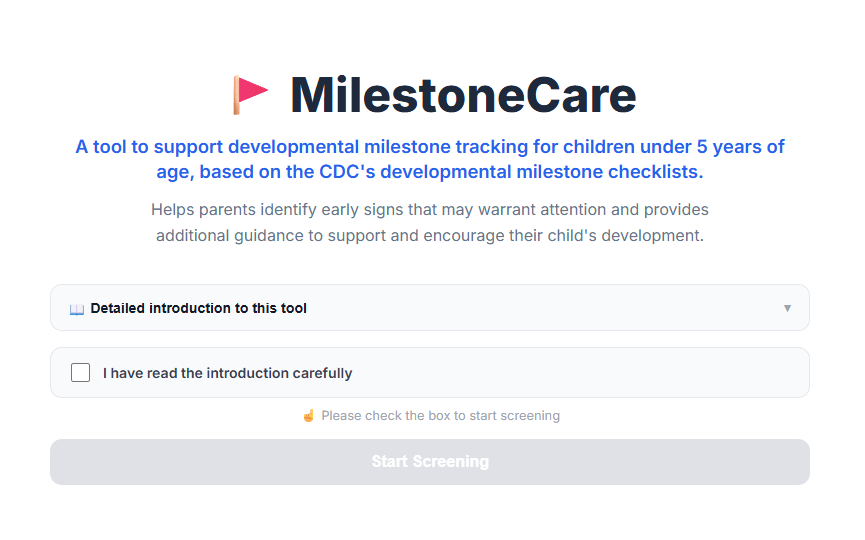
MilestoneCare is a tool designed to support parents in tracking selected developmental milestones in children based on the CDC Developmental Milestones Checklist from the Centers for Disease Control and Prevention (CDC).
The tool focuses on skills that most children (about 75% or more) can do by a certain age, across four major developmental domains:
- Social-emotional
- Language and communication
- Cognitive (learning, thinking, and problem-solving)
- Movement
MilestoneCare helps parents:
- Track developmental skills appropriate for their child’s age.
- Record skills that their child has already achieved.
- Identify skills that their child has not yet achieved or that parents are unsure about.
- Review suggested next steps when certain developmental milestones may need further monitoring.
- Prepare information and questions to discuss with a doctor or healthcare professional when needed.
For each developmental milestone, users select one of three options:
- Yes
- Not sure
- Not yet
Based on the information provided, MilestoneCare displays reference results and relevant suggestions.
Important note: MilestoneCare is a reference tool for developmental monitoring. It is not a standardized or validated developmental screening tool, does not provide a diagnosis, and does not replace examination, assessment, or advice from a doctor or healthcare professional.
Age Range
MilestoneCare supports developmental monitoring for children from 2 months to 5 years of age, with the following milestone age ranges:
2, 4, 6, 9, 12, 15, and 18 months; 2, 2.5, 3, 4, and 5 years.
When the child’s date of birth is entered, the system automatically determines the appropriate milestone age based on the information provided.
II. MilestoneCare User Guide
Step 1. Start the Tool
To access MilestoneCare, users can select the developmental milestone tracking tool on the Bác sĩ bên con website.
Before starting, users should read the introduction and important information about the purpose and scope of the tool.
After reading, check the box:
“I have carefully read the introduction”
Then select:
“Start”
to begin the tracking process.
Step 2. Enter the Child’s Information
MilestoneCare requires information about the child’s age to determine the appropriate developmental milestone checklist.
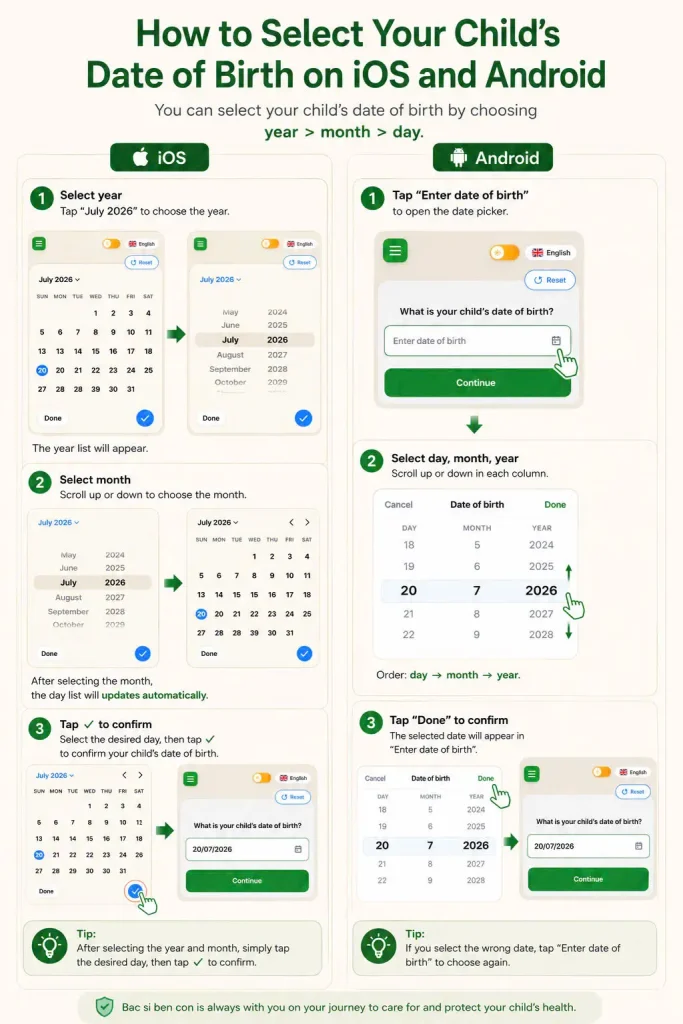
2.1. Enter the Child’s Date of Birth
Enter the child’s:
- Day of birth.
- Month of birth.
- Year of birth.
Based on the date of birth provided, the system automatically calculates the child’s age and determines the most appropriate developmental milestone checklist.
Entering the correct date of birth helps the system select the appropriate milestone age range for monitoring.
2.2. Children Born Prematurely
If the child was born before 37 weeks of gestation, users can select:
“Child was born prematurely”
and enter the child’s gestational age at birth.
For children born prematurely, the system calculates the corrected age to help determine a more appropriate milestone checklist during early childhood.
The formula used is:
Corrected age = Chronological age − (40 weeks − Gestational age at birth)
Corrected age is applied only when the child is under 24 months of chronological age. After this point, the system automatically switches to chronological age.
If users have difficulty determining the child’s date of birth or selecting the appropriate information, they can refer to the additional guidance available on the Bác sĩ bên con website.
2.3. Manually Select an Age
If users only want to preview the checklist for a different age—for example, to learn about developmental milestones that may be expected in the future—they can select:
“Or select an age manually”
This feature allows users to directly select one of the supported milestone age ranges without entering the child’s date of birth.
However, when an age is selected manually, the system does not calculate corrected age for children born prematurely.
Therefore, if the child was born prematurely, users should enter the child’s date of birth and prematurity information so that the system can determine a more appropriate milestone checklist.
2.4. Children Outside the Supported Age Range
If the child is under 2 months of age or over 5 years of age, MilestoneCare will inform the user that the tool is not suitable for the child’s age.
Users may explore other child health and care resources available on the Bác sĩ bên con website.
Step 3. Complete the Developmental Milestone Checklist
After the milestone age has been determined, MilestoneCare displays items to be monitored across four developmental domains:
- Social-emotional
- Language and communication
- Cognitive
- Movement
For each item, users select one of three options:
| Option | Meaning |
|---|---|
| Yes | The child has demonstrated the described skill |
| Not sure | The user has not clearly observed the skill or is unsure whether the child has demonstrated it |
| Not yet | The child has not yet demonstrated the described skill |
Users must complete all items in the checklist before viewing the results.
If any item remains unanswered and the user selects “View results”, the system automatically takes the user to the unanswered item so it can be completed.
Users should answer based on what they have observed in the child’s everyday activities and interactions.
Step 4. View the Results
After the checklist is completed, MilestoneCare summarizes the answers and displays reference results.
Depending on the information provided, the results may include the following situations:
4.1. The Child Has Achieved All Listed Milestones
If the child has demonstrated all of the skills assessed, the system indicates that the skills covered by the current checklist are consistent with developmental milestones expected for the corresponding age range.
Parents can continue to:
- Monitor the child’s development.
- Provide opportunities for the child to play, communicate, and learn.
- Complete checklists at subsequent milestone ages.
- Take the child for routine health checkups as appropriate.
4.2. One or More Items Are “Not Yet”
If the child has not yet demonstrated one or more skills, parents may:
- Continue monitoring the child.
- Provide appropriate opportunities for the child to practice and demonstrate the skill.
- Discuss their concerns with a doctor or healthcare professional if concerns persist.
Not achieving a single milestone does not necessarily mean that the child has a developmental problem. However, this information may be useful for continued monitoring and discussion with a doctor when appropriate.
4.3. One or More Items Are “Not Sure”
If the user is unsure whether the child has demonstrated a particular skill, they should continue observing the child during everyday activities.
Parents can also provide additional appropriate opportunities for the child to demonstrate the skill.
If the skill is still not observed after approximately 1–2 weeks, parents may consider treating the situation similarly to a “Not yet” response and discuss it with a doctor if they remain concerned.
4.4. Reminders About Developmental Screening
At ages when developmental screening is recommended according to applicable guidelines, MilestoneCare may display a separate reminder.
Users should note that using MilestoneCare does not replace routine developmental checkups or developmental screening recommended by a doctor or healthcare facility.
In particular, if parents have any concerns about their child’s development, they should discuss them directly with a doctor rather than relying solely on the results of the tool.
Step 5. Review Additional Information After the Results
Depending on the results, MilestoneCare may provide additional resources to support parents.
5.1. Other Things to Share with Your Doctor
This section provides questions or suggestions to help parents prepare information before taking their child to see a doctor.
Parents can use these suggestions to communicate more clearly about what they have observed or about any concerns they may have.
5.2. You Know Your Child Best
This section highlights the important role parents play in monitoring their child’s development.
If parents or the child’s doctor remain concerned about the child’s development, continued monitoring and appropriate professional assessment are recommended.
If a child loses a skill they previously had, parents should discuss this with a doctor for further evaluation.
5.3. Help Your Child Learn and Grow
MilestoneCare may provide suggestions for simple, safe, and age-appropriate activities that give children opportunities to play, learn, and develop their skills.
These activities are intended to support and encourage development. They do not replace professional intervention or treatment when a child requires specialized care.
III. Warnings and Limitations
MilestoneCare is designed to help parents monitor selected developmental milestones in children in a convenient and structured way.
The tool cannot:
- Replace an in-person examination of the child.
- Provide a comprehensive assessment of all areas of development.
- Diagnose developmental disorders.
- Replace standardized and validated developmental screening tools.
- Replace the professional judgment of a doctor or healthcare professional.
The results of MilestoneCare depend on:
- The date of birth or age information provided by the user.
- Selecting the appropriate developmental milestone checklist.
- The accuracy of the user’s answers.
- The parent’s ability to observe the child’s skills.
Parents should keep in mind that children may develop at different rates. Not yet achieving, or being unsure about, certain milestones does not necessarily mean that the child has a developmental problem.
However, if parents have concerns about their child’s development—particularly if the child has multiple milestones that have not yet been achieved or loses skills they previously had—they should discuss these concerns with a doctor or healthcare professional for appropriate evaluation.
IV. Using MilestoneCare
Before using MilestoneCare to monitor a child’s development, users should take some time to become familiar with how the tool works.
Users may practice with a hypothetical situation to become familiar with the entire process, including:
- Entering the child’s date of birth.
- Selecting prematurity information when applicable.
- Determining the appropriate age-based checklist.
- Answering the checklist questions.
- Reviewing how the system summarizes the results.
- Reading the reference information and guidance provided after the results.
Becoming familiar with the process in advance can help users understand how MilestoneCare works and reduce confusion when using the tool to monitor a child’s development in real-life situations.
MilestoneCare also provides several options to improve the user experience, including:
Multilingual Support
The interface and guidance are available in Vietnamese and English, allowing users to select their preferred language.
Dark Mode
Allows users to choose an interface that is more suitable for their environment, particularly in low-light conditions.
V. Restarting the Tracking Process
After completing the checklist and viewing the results, users can restart the tracking process when needed.
Users may want to start again when:
- The child’s date of birth was entered incorrectly or the wrong age was selected.
- The child’s information has changed or needs to be updated.
- The user wants to check a different milestone age.
- The user wants to complete the checklist again after monitoring the child for a period of time.
When using the tool again, users should ensure that the information provided is accurate and reflects the child’s current situation.
VI. Frequently Asked Questions
Does MilestoneCare replace a doctor’s visit?
No.
MilestoneCare is a tool designed to support developmental monitoring and provide reference information about children’s developmental milestones. It is not a diagnostic tool and does not replace examination, assessment, or advice from a doctor or healthcare professional.
Should I be worried if my child has not reached some milestones?
Not necessarily.
Children may develop at different rates. Not yet demonstrating a few skills does not necessarily mean that the child has a developmental problem.
However, parents should continue monitoring the child and discuss their concerns with a doctor if they remain worried, particularly if the child has multiple milestones that have not yet been achieved or has lost a skill they previously had.
What if I am not sure whether my child has achieved a particular skill?
Continue observing your child during everyday activities and provide appropriate opportunities for the child to demonstrate the skill.
If you remain unsure after observing the child for some time, or if you notice that the child has not yet demonstrated the skill, you may discuss your concerns with a doctor for further guidance.
Can I view the checklist for a different age?
Yes.
Users can manually select a different milestone age for reference, for example, to learn in advance about skills that their child may be expected to develop in future stages.
However, if the child was born prematurely, manually selecting an age does not apply corrected age. In this case, users should enter the child’s date of birth and prematurity information so that the system can determine a more appropriate checklist.
Is an English version of the tool available?
Yes.
Users can switch languages directly on the page to use the interface and content in either Vietnamese or English.
Where can I report inaccurate information?
Please contact us by email:
In particular, if you identify an error that could affect the monitoring or care of a child, please report it as soon as possible so that it can be reviewed and addressed.
Reference: CDC – “Learn the Signs. Act Early.”
Bác sĩ bên con © 2026
MilestoneCare – A Tool to Support Developmental Milestone Tracking in Children